9 Ways to
Re-purpose Your Presentation
March 15. 2016
 Whether you are a regular speaker at conferences, create presentations for your colleagues, or decided to participate in a webinar, there will be times when you have to put in the work to create an awesome presentation.
So the last thing you want to do is let all that hard work go to waste when the presentation concludes. Instead, you want to repurpose your presentation into other creatives, allowing you to get the full benefit of your efforts.
Here are a couple of ideas to repurpose your presentation into other formats.
Upload Your Presentation to SlideShare
This is a pretty simple concept, but something everyone should consider doing with their presentations.
Owned by LinkedIn, SlideShare has the ability to provide thousands of views to your presentation, has a number of features like ‘Trending in Social Media,’ and also promotes popular presentations to their own network, through emails, social, and featured placement on the SlideShare homepage.
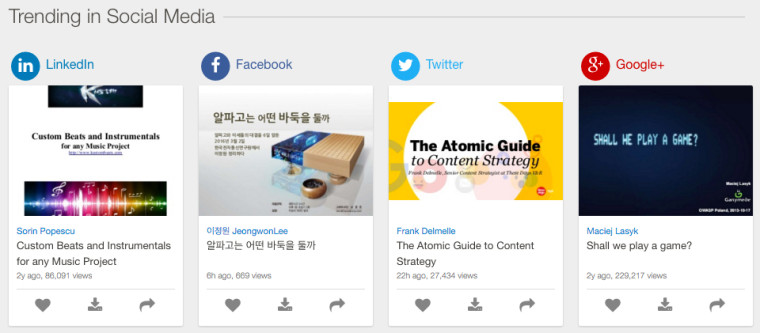 Make sure when uploading your presentation you provide a good title,description, andkeywords, to improve your visibility and success.
Turn Your Presentation
Into An Article
You already have all the content required for a good article, along with a
sense of the story and tone with which you present, so it really takes
very little effort to turn your presentation into a traditional article, using
the slides as possible images for both your article and social media.
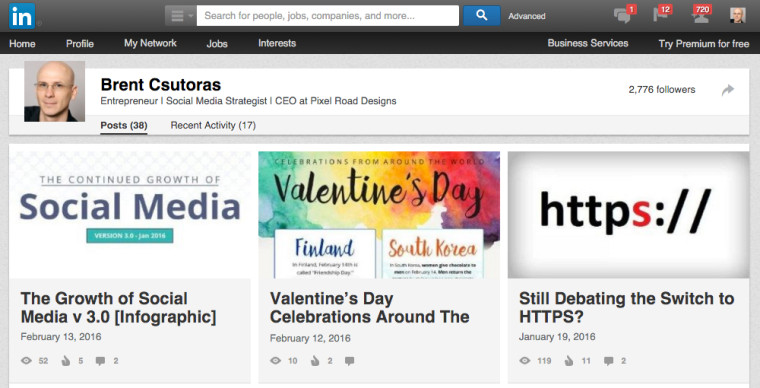 Bonus: Write a second version (or third, fourth, etc) that is slightly lighter than
your full article, or that focuses on a specific angle of the presentation, to use
for respected blogging platforms like LinkedIn, Medium, and even Facebook
Notes.
In all versions, link back to the full article and the presentation.
Use Your Presentation
as a Newsletter
If you have taken the time to create a presentation, it is likely because you
have something important to share and teach, so why not share it as a
newsletter to all your subscribers?
So often newsletters are too promotional, so take this opportunity to provide
something of value to your subscribers.
Create an Infographic
From Your Presentation
A big part of creating an effective presentation is presenting concise thoughts
and data, with the assistance of good visuals while maintaining a smooth flow
that ties all elements of the presentation together.
are primarily created because there is a demand for the information, there is
likely going to be a demand for an infographic created with the same information.
Visualize Your
Presentation Into Social Media Images
We are constantly looking for visual content to share on our social media
channels, especially in industries that do not have a lot of visual products
and services.
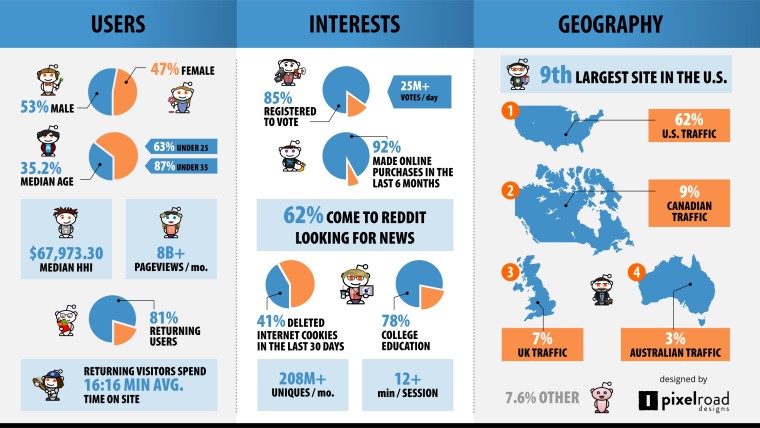 So why not take the information and visuals you created for your presentation,
to create social media images to share on your channels.
Turn Your Presentation
Into a Webinar
Webinars are powerful tools for educating and marketing. If people are willing
to come and see you speak in person, there will be a lot of people who would
attend a webinar for your presentation.
didn’t work in the original presentation and make it better.
Record Your
Presentation
Either after you have completed presenting or during one of your practice runs,
take the time to record yourself giving your presentation.
Not only can it help you improve on your presentation, but it gives you video
content that can now be in your articles, on your site, uploaded to Vimeo or
YouTube, and shared on your various social media channels.
Here is a recent Webinar, that was recorded and uploaded to
Use Your Recorded Presentation as a
Podcast
Once you have recorded your presentation, it is quite easy to separate the
audio track from the video, which can now be used as a podcast episode.
Alternatively, you can use the same topic and discuss it with an industry thought
leader.
Use Your Presentation
to Start a Whitepaper
A lot of work has gone into your presentation, so why not take this time to
expand on the concept, dive deeper in each area, and create a high-quality
whitepaper on the topic.
In addition to now having a whitepaper to share with your customers and
network, but you will also likely learn a lot more about the topic, improving
future presentations.
Turn Your Presentation
Into a Course
Online courses have continued to increase in popularity over the years, and
one of the best ways to jump into providing an online course is to start with
a presentation you spent a lot of time researching and preparing.
to create your courses and profit through revenue sharing each time your
course is purchased.
At the end of the day, you spent a great deal of time and energy on your
presentation, so it is worth it to expend a little extra effort and turn it into one
(or more!) of the creatives above and get the most ROI for your energy, time,
and expertise.
Did I miss any other creatives or opportunities? If so, do us a favor and
please comment below.
Image Credits
Featured Image: Image by Search Engine Journal
In-post Photo: Image by Pixel Road Designs. Used with permission.
All screenshots by Brent Csutoras. Taken March 2016.

Brent Csutoras
Managing Partner & Chief Social Media Strategist at Search Engine Journal
Founder & CEO of Pixel Road Designs, a well respected marketing design firm, and Managing Partner at Search Engine Journal. Brent has over 10 years experience in Social Media Marketing and is an avid Futurist, focusing on the implications of future technology on society and societal growth.
Disclaimer: Digital Propeller does Not own this content please give all credit to he original author (Brent Csutoras) and site owner (https://www.searchenginejournal.com/9-ways-to-repurpose-your-presentation/158647/).

No comments:
Post a Comment